Phishing in 2026: The 10-Second Check That Saves Your Account
Learn the five red flags of phishing and a simple Pause, Inspect, Verify, Report habit that protects your accounts. A practical guide by HackyWorld.
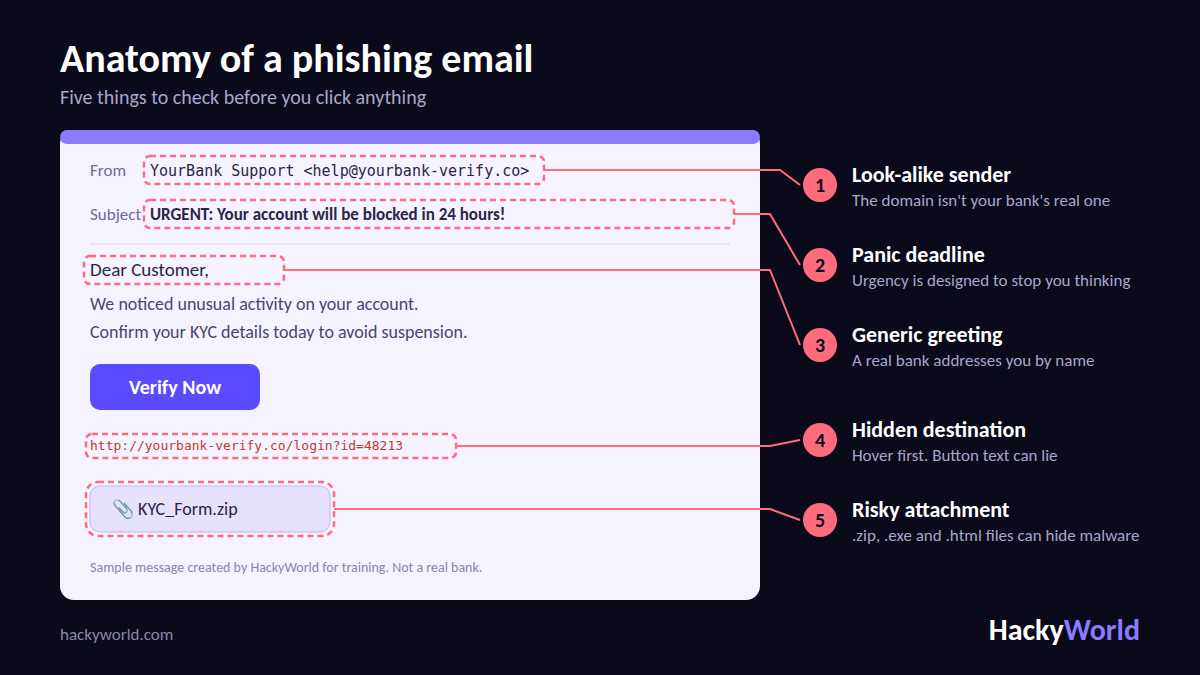
Most people imagine a hacker as someone typing furiously in a dark room. In reality, many breaches begin with something far more ordinary: a message that looks routine, and a person who is busy, tired, or worried at the wrong moment.
That is phishing. It doesn't beat your antivirus or your firewall. It beats your attention. At HackyWorld, we train learners and businesses to defend against exactly this, and this guide gives you a simple habit you can use today.
Why Phishing Keeps Working
Attackers rely on three human reflexes:
- Fear: "Your account will be blocked."
- Greed: "You've won a refund or reward."
- Obedience: "Your manager needs this payment now."
A phishing message creates one of these feelings and then hands you an easy action: click here, call this number, reply with your OTP. The whole trick is to make you act before you think.
New to security terms? Our Cybersecurity Fundamentals course builds the basics from zero, including how threats like this work.
The Many Faces of Phishing
You don't have to memorise every variation, but knowing the families helps you recognise the pattern:
- Email phishing: Bulk messages posing as banks, shops, or popular services.
- Spear phishing: Personalised messages that mention your name, role, or colleagues.
- Smishing: Fake SMS about parcels, KYC updates, or unpaid bills.
- Vishing: Phone calls from "bank staff" or "tech support" who push you to share an OTP or install a screen-sharing app.
- Business Email Compromise: A fake message from your boss or vendor asking for an urgent transfer or new bank details.
- Quishing: A malicious QR code on a poster, parcel, or email that opens a fake login page.
Fake login pages often succeed because real websites have weaknesses too. To understand that side, see our Web Application Security & OWASP Top 10 course.
Five Red Flags to Check
- Look-alike sender. The name says "YourBank", but the address belongs to a different domain. Always read the part after the @ sign.
- A panic deadline. Real organisations give you time and official channels. Scammers give you 24 hours.
- A generic greeting. "Dear Customer" is a bulk-mail habit. Your bank knows your name.
- A hidden destination. Button and link text can say anything. Hover (or long-press on mobile) to see where it truly goes.
- A risky attachment. .zip, .exe, .html, and macro-enabled Office files are common malware carriers.
A tip for 2026: don't rely on spelling mistakes as a warning sign. AI tools help attackers write polished, natural messages, so a clean email is not automatically a safe one.
The HackyWorld 10-Second Check
Awareness only helps if it becomes a habit, so we boiled it down to four moves:
- Pause. Take one breath before tapping anything urgent. Urgency is the attacker's main tool, so slowing down is your main defence.
- Inspect. Look at the sender address, hover over the link, and check any attachment name. You are looking for mismatches, not perfection.
- Verify. Confirm through a channel you already trust: your bank's official app, the number on your card, or a direct message to your colleague. Never use the phone number or link provided in the suspicious message.
- Report. Flag the message to your email provider or IT team, then delete it. Reporting protects the next person who receives the same message.
If any step feels wrong, stop. Don't click, don't reply, and don't call back.
Build Layers, Not Hope
No single tool stops every phishing attempt. That is why security professionals think in layers:
- Updates and filters: Patched browsers, operating systems, and spam filters block many known bad links before you ever see them.
- A password manager: It fills credentials only on the genuine website, so a lookalike domain gets nothing. When your manager refuses to autofill, treat that as an alarm.
- Two-factor login: Even if a password is stolen, the attacker still needs the second factor. Prefer an authenticator app or a security key over SMS codes when you can.
- Your awareness: The final layer, and the one attackers target most. It also grows with practice.
If You Already Clicked
It happens to careful people too. What matters is the next ten minutes:
- Disconnect the device from the internet if you opened a file.
- Change the password of the affected account, and of any account that shares it, from a clean device.
- Turn on or reset two-factor login.
- Call your bank right away if you shared card, UPI, or net-banking details.
- Run a full security scan.
- Report it. In India, use cybercrime.gov.in or call 1930.
Speed matters. The sooner you act, the more you can usually recover.
For Businesses and Academies
Employees are the largest attack surface of any organisation, and also its best sensor. Teams that do well tend to:
- run short, regular phishing awareness sessions and test emails
- require two-factor login for every staff account
- publish a simple "how to report a suspicious message" process
- never punish someone for reporting a mistake quickly
HackyWorld supports organisations with cybersecurity, web and app development, and mock test software. Explore our services or talk to our team.
Turn Awareness Into a Career
Analysing phishing is daily work for SOC teams, penetration testers, and bug bounty hunters. If this topic interests you, read our guide on Cyber Security Careers: Where the Opportunities Are and How to Get In, then pick a path:
You can also browse all HackyWorld courses, join a live class, or compare pricing.
The Takeaway
Phishing is a pressure game. You win it by refusing to be rushed. Remember the four words: Pause, Inspect, Verify, Report. Share this post with someone who often forwards "urgent" messages, because one informed person can stop a scam from spreading.
Stay curious, stay alert, and keep learning with HackyWorld. Create your free HackyWorld account or read more guides on the HackyWorld Blog.